

All software for the project is open source, and is based on a Unified Firmware Platform, which utilizes the same firmware base on all hardware, so all the features are available across various platforms. The transceiver modes implemented are dependent on the hardware type.
All software has the following features:
| Feature | Description |
|---|---|
| Setup Menu | An intuitive menu to set up parameters such as frequency, mode, power, callsign, etc. |
| Beaconing | A station identification message sent periodically to all stations |
| Mesh table | A collection of all stations heard and routing information to find them. |
| AX.25 compatibility and KISS mode | A serial interface that accepts and generates AX.25 frames in KISS format |
| Chat mode | A simple chat application for sending messages between stations. |
| Ping mode | A dedicated message to request a response from a remote station. Manual or timed. |
| Serial Peripheral Interface (SPI) | A high speed serial interface to a host processor that accepts IP frames |
| Real Time Clock | A real time clock with accuracy of 5 seconds to timestamp mesh entries. |
| Repeat (Digipeater) | An ability to repeat frames based on station callsigns. |
| Status monitoring and LED display | A series of LEDs to indicate the node status, which can be on/off or flashing. |
The diagram below illustrates the general software architecture. Hardware platforms may implement all or a subset of the functionality.
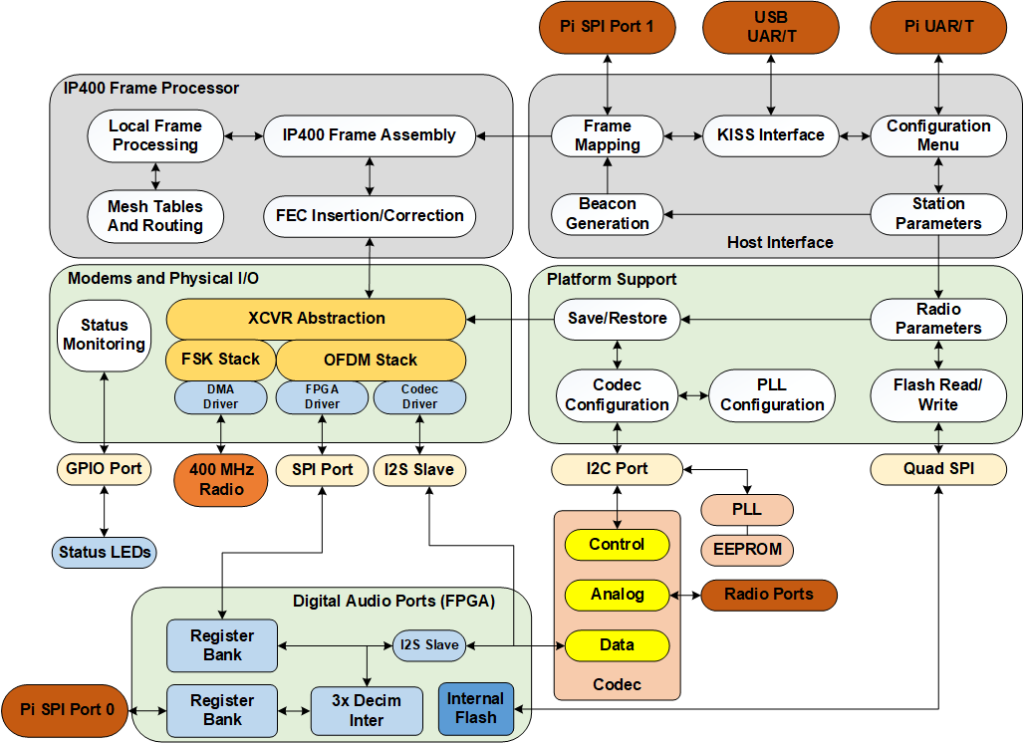
There are four main components to the node firmware:
- Host Interface. The primary data interface to the node, which can either be a UAR/T or a Serial Peripheral Interface (SPI). This module also contains the setup parameters and beacon generation. A GPS receiver and second UAR/T can optionally be added for more accurate position generation.
- IP400 Frame processor. This module creates and receives IP400 Frames for transmission, including forward error correction. Local frames, for applications such as chat and ping, are processed in this module, and the mesh table is created and maintained here as well.
- Modems and Physical I/O. This module contains an abstraction layer for each modem type, along with interfaces for 4FSk and the OFDM-AB modem. The physical I/O module varies depending on the modem hardware.
- Platform Support. The contents of this module varies depending on the hardware type, functions include setting up a clock generator and an analog codec.
- Digital Audio Ports. Two audio ports that connect to the codec, one for use by the Pi, the other the processor. Pi port supports Allstar with 16-bit PCM and a custom audio driver
To download the code for the UFP, please visit the links page.